
Leading Distributor for Machine Vision Components and Technologies in SEA

Norpix StreamPix

High speed digital video recording software
Main  >  Product  >  Image Processing Software > Norpix > StreamPix

Norpix StreamPix

High speed digital video recording software

  • Three StreamPix versions available; Lite, Single full camera, Multiple camera.
  • Supports a wide selection of cameras and frame grabbers.
  •  Free and Premium modules such as GPS, IrigB, Audio and multiple camera merging.
  • Compatible 1/10/25/50/100 GigE Vision, USB3, Camera Link, CoaXPress, ONVIF, Firewire, Web IP, WDM and Fiber based.
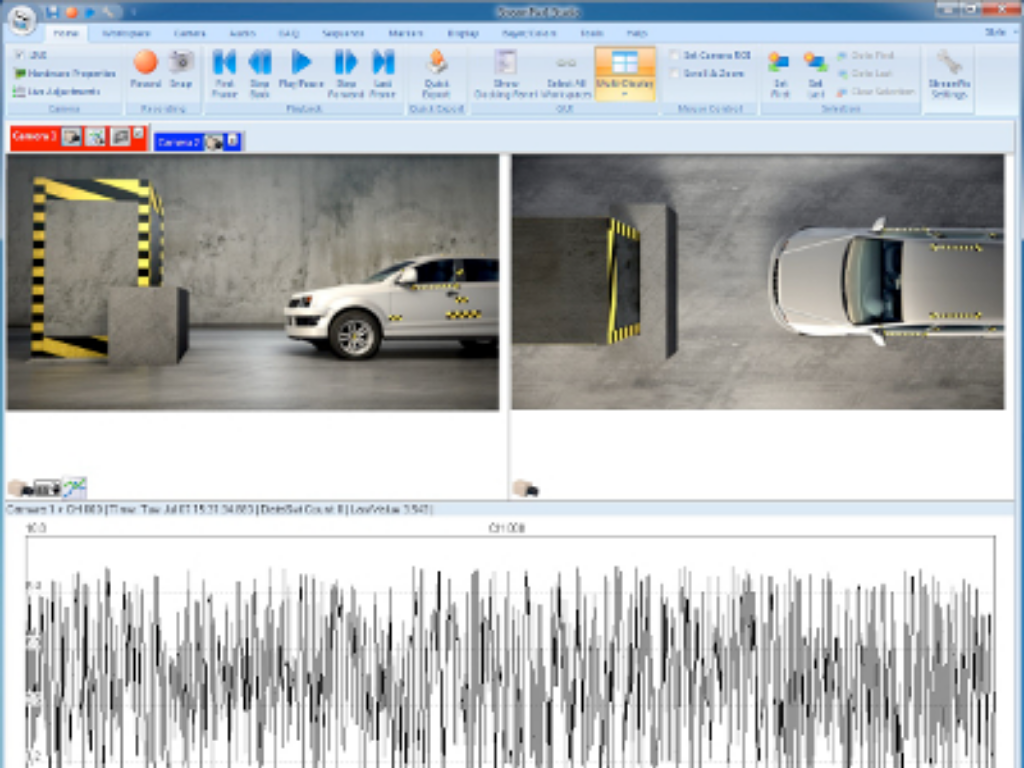
  • State of the art customizable GUI.
  • Console for setup, control and acquisition.
  • Capture at up to 22 Gigabytes/second.
  • Continuous upgrade and software maintenance.
  • Tech support through email, phone and gotoassist.com.
  • Windows 10 & Windows 11 (64 bit).
  • Supports codecs such as JPEG, H.264, HEVC, M-JPEG, MPEG4, AAC and MP3.
  • Accelerated compression using NVIDIA CUDA GPU.
  • Multiple language support: German, Chinese Traditional and Simplified, Korean, Spanish and French.
  • Multicamera synchronized capture and synchronized playback.
  • Web Streamer:  Stream cameras to the web.

OS / Hardware / Drivers

  • Compatible only with Windows 10 & Windows 11 (64 bits).
  • Install StreamPix on a desktop computer (power/cost) or on a laptop/Portable PC (portability).
  • Supports 100+ cameras and frame grabbers from top manufacturers.
  • Will work with any camera which has a WDM Directshow driver. (Ex: Most webcams)

Playback

  • Support sequence & AVI playback at various rates.
  • Playback according to the time stamps of the image.
  • Playback forward, backward and at any speed (slow motion) or frame-by-frame.
  • Browsing sequences is made easy by the sequence slider bar and the various VCR-like controls.
  • Synchronized playback of multiple sequences or AVI based on frame index or time stamp.
  • Sequence history allows to reload every sequence from a previous recording session.
  • Thumbnail viewer: View captured sequences as individual, resizable thumbnails.
  • Timeshifted Playback (TIVO style).

Recording

  • Record to sequence file on disk (raw or compressed).
  • Record directly to RAM for ultra-high-speed capture.
  • Capture or export sequences to AVI in real-time using any installed codec.
  • Capture or export to image formats including: BMP, JPEG, TIFF, PNG, FITS, DPX etc.
  • Customizable read-ahead buffer list to insure no frame will be dropped during recording.
  • Continuous loop for video buffering for machine vision or security applications.
  • Pre/Post Recording with variable Pre and Post duration.
  • Each captured image is precisely timestamped with microsecond precision.
  • External time source can be used to syncronize with IRIG-B or GPS time using the ATS module.
  • Automatic, customizable file naming schemes.
  • Powerful recording manager allows lots of flexibility for defining recording scheme.
  • H264 multi-channel recording.
  • Simultaneous and synchronous multichannel audio and DAQ recording. (*)
    Watch dog


Color Processing

Real-time Bayer interpolation, color correction, color balance & color remapping

Most modern color sensors are using a Bayer sensor. A Bayer sensor delivers a raw image that needs to be color interpolated to generate the real color. StreamPix can perform accurate real time Bayer rendering to allow live color image display while still streaming the raw image to disk. A raw image is 1/3 the size of a color image but contains all the color information uninterpolated. In addition to real time color rendering, raw sequences can also be exported to true RGB 24 or 48 bit color image.

Various interpolation algorithms can be chosen to assure the best possible color rendered image.
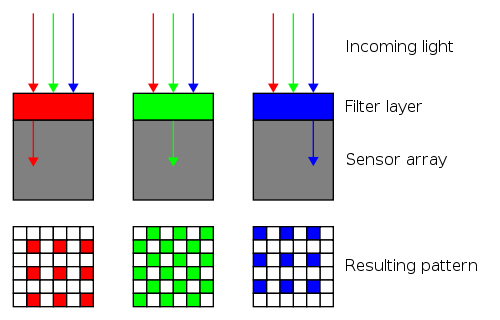
Advanced color grading with 3D LUT, compatible with IRIDAS .look files

Advanced color grading allows even better color rendering from a raw bayer image, with the compromise of intensive CPU calculation. To shorten calculation, StreamPix is able to use CUDA NVIDIA enabled GPU to speed up the grading process.


Triggering and I/O

Input Line Monitoring

StreamPix can monitor various input lines. Any level change on those lines can trigger various events into the software. Possible events are:

  • Start recording
  • Stop recording
  • Toggle recording
  • Mark a frame
  • Generate a Pre-Post

Output Line control

  • Recording started
  • Recording stopped
  • On Start Playback
  • On Image Captured
  • On Pre-Post Received

CUDA JPEG and H.264 Real Time Compression Module

StreamPix now supports NVIDIA’s based GPU to perform real time JPEG and H.264 image compression on high resolution and high speed cameras. Capture from high speed sensors direct to disk JPEG or H.264 compressed format, eliminating the need to use expensive RAID 0 disk array setups.

New: Compress from high speed and high resolution CoaXPress cameras. Both types of compression in StreamPix can be applied in real-time during the recording. Additionally, it can also be applied during export.Compression during export as a post recording operation allows to deal with cases where the CPU or GPU is not fast enough to perform the compression real time.

JPEG compression
: It requires Fermi architecture or newer (Kepler, Maxwell, Pascal, Volta). Depending on the image size and required processing time, the number of shader processor units available on the GPU is important. Most part of the algorithm is performed on the CUDA processors, but the shader processor units are used in the last step of the calculation. Each shader can process about 90 million pixels per second
NVidia

Image Compression

StreamPix performs uncompressed image recording by default. However, some experimental constraints may require image compression. This allows reducing the total amount of disk space needed, but will also compromise the image quality. When recording to sequence file (.SEQ), the following compression schemes are possible:

  • Lossy JPEG (image quality and compression factors can be fine tuned)
  • H264 (bit rate as a percentage of uncompressed image size).
  • RLE encoding (loss less).
  • Huffman encoding (loss less).
  • LZ encoding (loss less).

When recording directly to AVI, StreamPix supports, in theory, all available DirectX codecs. Some codecs are freeware, while others are paid codecs. Also, some codecs may not support all of the image formats and resolutions that can be captured with StreamPix. You must check and test the codec with StreamPix to make sure the codec performance and compatibility is suitable to your needs.

Network & Remote Operations

  • StreamPix can be remotely controlled via StreamPix Remote (sold separately).
  • A single StreamPix Remote can control and synchronize multiple StreamPix clients running on different networked computers.
  • StreamPix application will provide live image feed to StreamPix Remote operator.
  • StreamPix license management can be handled via a local USB dongle or via a licensing server running on the same computer network.

Interface & Customization

  • Microsoft Office Ribbon UI for increased ease of use (large buttons with captions).

  • Large toolbar allows StreamPix to be used on touch-screen monitors.
  • Customizable interface background color for low-light environments (night vision like astronomers).
  • Customizable multi-display image mode, with quadrant selection and hybrid mode (one large quadrant, others small). IMAGE of HYBRID mode.
  • Full screen / Multi-monitor support.
  • Customize your ribbon’s contents: Add or remove controls to suit your needs.
    • No programming: Great way to make StreamPix easier to use for non-technical users.
    • Add, remove or order tabs, panels or ribbons as desired.
    • Password protected access to prevent end user from modifying the layout.

Utilities

StreamPix is bundled with a few utility applications that make daily usage of the software easy:

  • Sequence Viewer is offering most common playback and viewing options for sequences (comes also as a free stand alone application that can be installed on any computer without the need for a license).
  • Disk benchmarking toolbox to measure your hard drive performance: This will help you determine the maximum possible streaming and image recording speed to your computer hard disks.
  • Sequence Header Editor to recover corrupted sequence files.
  • The SendRM tool is a command line application that allows triggering various actions, such as starting/stopping a recording, on a running instance of StreamPix. This tool can be used by your custom application to interact with StreamPix. You can also use it along with the Windows Scheduler to set up multiple recording sessions over a long period of time.
  • Matlab macro for reading Streampix .seq files.
  • Auto-copy function to automatically copy/move sequence files to a remote computer (using either robocopy or FTP) after a recording.

The Batch Processor is a separate stand alone application used for offline processing and image exporting. It requires a separate license.

Area Scan Camera Finder

Camera Finder

Click to search now

Line Scan Camera Finder

linescan Finder round 220 pix

Click to search now

Machine Vision Lens Finder

Click to search now

Machine Vision Lighting Finder

Click to search now

Main  >  Product  >  Image Processing Software > Norpix > StreamPix